install Indexhibit automatically
Install Indexhibit in one minute! No need to FTP files or set up a database, the installer does all the work for you. Indexhibit installation for dummies? Our Indexhibit installer is stupid simple! Use our auto-installer to install Indexhibit on your domain or we can install Indexhibit for you. You will need to provide your own copy of Indexhibit to install.
We are not affiliated with Indexhibit™ or indexhibit.org. We provide an installation service only. We cannot provide you with a copy of indexhibit. You can register and download Indexhibit here.
Indexhibit automatic installer
LAUNCH INDEXHIBIT INSTALLER (requires login)
Indexhibit now requires registration before you can download. Here is the link to login to indexhibit.org.
If you need help with installation open a support ticket we'll get you up and running.
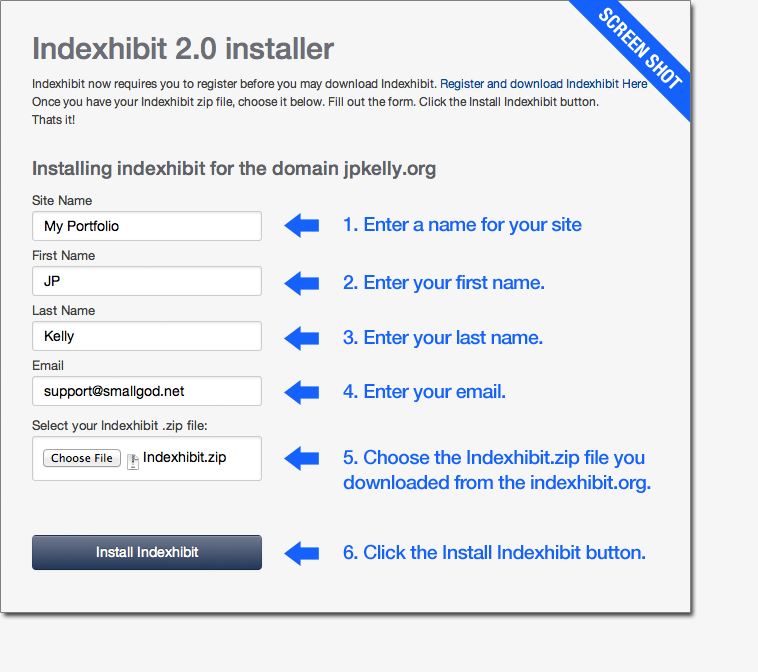
how to use the Indexhibit installer
Installation is simple. Once you download your copy of Indexhibit from indexhibit.org, launch the installer. Fill out the fields, select your Indexhibit.zip file and click the button. You're done! (The installer installes Indexhibit on your smallGod hosting account so you need to log in use the installer.)